Vendor
Manager:
Vendor
Manager allows you to capture the details of all the vendors or the resume
sources that help you in sourcing the candidates for the requirements. To
create of edit the source details navigate to Manager > Source Manager.
Capturing
Source Details:
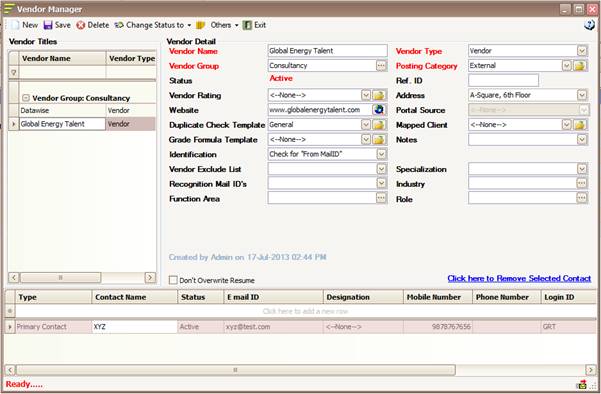
To
capture the source or vendor details open source manager and fill the following
fields:
Vendor Name: Enter the
name of the source or the vendor.
Vendor Type: Select the
Type of the source.
Vendor
Group: Select
the Source group.
Address: Mention the
address of the source or the vendors.
Website: Mention the
Website for the source or the vendors.
Duplicate
Check Template: Select the Duplicate Check Template.
Identification:
Select the
Identification method to be used.
Vendor
Recognition mail ID: Mention the domain of the mail id (@hirecraft.com)
Notes: Can be used
to capture any details related to the Source or the Vendors.
Capturing
the Vendor Contact Details:
To
capture the contact person details for the source navigate to source manager
and select the respective source name from the list displayed in the left
panel.

Mention
the following details:
Contact Name: Mention
the name of the Contact person for the Source.
Status: Select the
Status of the contact.
Email ID: Mention
the Email ID of the contact.
Designation: Select the
Designation of the contact.
Mobile Number: Mention the Mobile number of
the contact.
Phone Number: Mention the direct line number
of the contact.
Login ID: Mention the login id for the
contact if in case you have opted for Vendor portal.
Password: Mention
the password for the vendor portal (if opted).